- Published on
Power Pages review of Claude Code
- Authors

- Name
- Calum Harrison

Microsoft are experimenting with a preview feature that enables tools like Claude Code to integrate with Power Pages
Power Pages Plugin for Claude Code
This is my review of this feature and will let you know if it's worth considering for future projects.
At the time of writing, this feature is in preview and should not be used in production environments.
Example
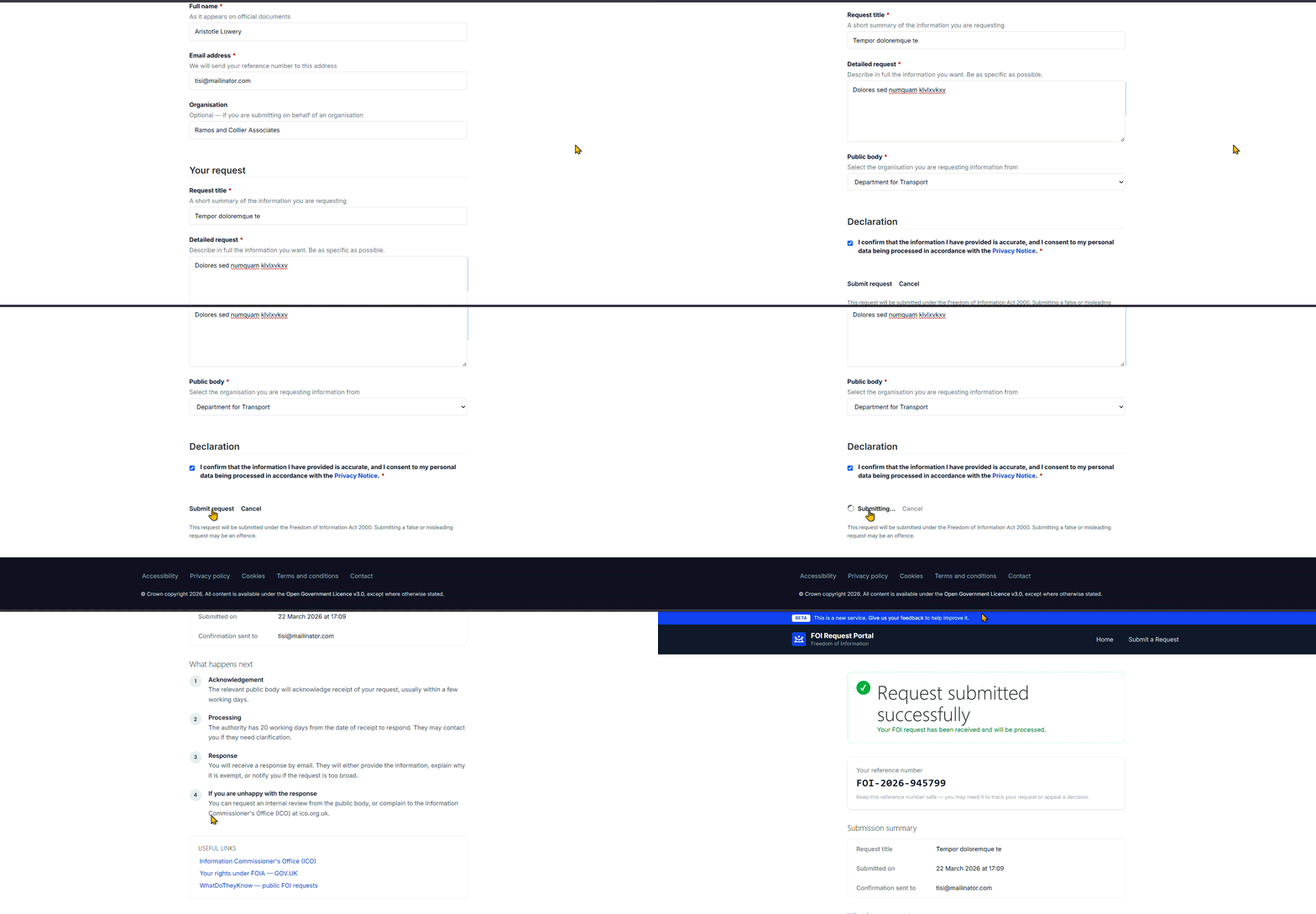
I've asked Claude Code to generate a freedom of request portal with the below prompt.
Claude prompt
You are an expert React.js and frontend developer.
Create a modern, minimal, and clean React.js website for submitting Freedom of Information (FOI) requests.
Tech stack:
React (with functional components and hooks)
Tailwind CSS for styling
No heavy UI libraries (keep it lightweight and clean)
Use simple state management (useState/useReducer)
Structure the project cleanly for future integration with Power Pages / Dataverse APIs
Design requirements:
Minimal, GOV.UK-inspired clean design (lots of whitespace, simple typography)
Mobile responsive
Accessible (basic a11y: labels, aria where appropriate)
Pages / Features:
Home Page
Brief explanation of what an FOI request is
CTA button: "Submit a Request"
FOI Request Form Page Form fields:
Full Name
Email Address
Organisation (optional)
Request Title
Detailed Request (textarea)
Public body being requested from (dropdown or input)
Consent checkbox (required)
Validation:
Required field validation
Email format validation
Show inline errors
Confirmation Page
Show a success message after submission
Display a generated reference number (mock for now)
Explain next steps
Functionality:
Handle form submission with a mock API function (simulate async request)
Structure code so API layer can later connect to:
Power Pages Web API
Dataverse
Keep API logic separated (e.g. /services/api.js)
Components:
Reusable Input component
Reusable Button component
Layout wrapper (header + footer)
Form components broken down cleanly
Styling:
Use Tailwind classes only
Clean spacing, rounded corners, subtle shadows
Neutral color palette (white, gray, blue accents)
Extras:
Add loading state on submit button
Disable button while submitting
Show error message if submission fails (mock failure case)
Output:
Provide full project structure
Include all React component code
Include Tailwind setup
Keep code clean and readable with comments
Important:
Do NOT overcomplicate
Do NOT use Redux or heavy frameworks
Prioritise simplicity and clarity
This is an MVP that could later be integrated into Power Pages
Optional:
Add notes on how to connect this to Power Pages / Dataverse later
It uses the default publisher by default so make sure to ask it to create configuration under a custom publisher.
I noticed some issues around accessibility for color contrasts for some elements and a few inconsistencies in component structure, which required manual fixes. Overall what it produced was great.
Bit of background
Claude Code is an intelligent coding assistant that can generate code with human prompts similar to the other products out there like Github Copilot.
The Power Pages Plugin, introduces skills that allow Claude Code and Github Copilot to gather context from Dataverse and deploy actions like "create a site" etc. A full list of supported skills can be found below (taken from Microsoft's learn website).
| Skill | Command | What it does |
|---|---|---|
| Create site | /create-site | Scaffolds a site, applies your design direction, and builds pages and components |
| Deploy site | /deploy-site | Builds the project and uploads it to Power Pages by using PAC CLI |
| Activate site | /activate-site | Provisions a website record and assigns a public URL |
| Set up data model | /setup-datamodel | Creates Dataverse tables, columns, and relationships |
| Add sample data (optional) | /add-sample-data | Populates Dataverse tables with realistic test records |
| Integrate Web API | /integrate-webapi | Generates typed API client code, services, and table permissions |
| Set up authentication | /setup-auth | Adds sign-in and sign-out functionality and role-based access control |
| Create web roles | /create-webroles | Generates web role YAML files for user access management |
| Add SEO | /add-seo | Generates robots.txt, sitemap.xml, and meta tags |
While elements of this have existed before (PAC CLI, Dataverse automation), bringing it together through a single AI-driven workflow is new and will challenge how we produce Power Pages solutions.
Benefits of Power Pages AI Development
Speed to market
Overall running the entire process from "create-site" to "create-web-roles" it took around 2 hours for Claude Code to complete. Now when we compare this to standard software development this is a HUGE reduction of time. Something like this before may have taken several days or even a sprint of work (around 1–2 weeks depending on complexity).
With this feature, customers can have proof of concepts sooner and overall solutions can be delivered faster, saving time and money.
I observed that the skills runs axe-core scripts (automated accessibility tests) that's really cool never heard of this library before.
More focus on architecture than UI/UX
Out of the box without significant work, Power Pages sites don't look modern. So before you would have to spend a lot of time messing around with CSS to try and get something to look presentable (as you can tell I'm not a huge fan of CSS). Whereas now, single-page-applications we can use other frameworks like Tailwind and combine this with Claude Code and you get a modern, responsive website created with ease.
With the above benefit, this allows more time for Power Pages makers, to focus on functionality or security where it matters.
Power Pages development is more accessible.
Power Pages has always been the distant member of the Power Platform family as it's not really low/no code compared to Canvas Apps etc. For someone to produce something properly they need web development experience to understand HTML,CSS,JavaScript, Liquid and how the DOM works in browsers etc and as a result most people would shy away from this if they have not come from a software/web development background.
Now with coding assistants, anyone in theory can generate a sophisticated Power Pages site that can act as a great starter to a project.
Should you use it

Overall I'd say this plugin is brilliant to accelerate development and to show an MVP to a client. You still need someone to understand how Power Pages works and to conduct these tasks.
- Designing the correct Dataverse data model
- Setting up table permissions securely
- Managing environments and ALM properly
The fact that these tasks can be completed is super sci-fi and it will be interesting to see if they add anymore skills like "create documentation" or "create automated tests".
Claude at the moment, get's through too many tokens as I ran out of tokens mid way through the process but I'm sure this will be improved down the line.
To get the most out of the tool, it's worth understanding the basics of React JS and Typescript and how to use Visual Studio as it will save you time and will make you more confident with what the AI outputs.
Due to the above, I'd hope that pro-code developers/architects that understand the Power Platform will be valuable to shape and maintain code-apps and single-page-applications but we will wait and see.
The views and opinions expressed in this blog are my own and do not reflect the views or opinions of the company I work for.