- Published on
How to use React States for Power Platform Code Apps #5
- Authors

- Name
- Calum Harrison

How do we deal with storing information for our components, for instance someone selecting a dropdown and we then want to show data based on the dropdown value selected.
We use something called State and in this blog I will show a simple example by using local data so you can replicate this easily.
I was trying to find a definition of State in React JS and this explanation is really clear. React documentation
Components often need to change what’s on the screen as a result of an interaction. Typing into the form should update the input field, clicking “next” on an image carousel should change which image is displayed, clicking “buy” should put a product in the shopping cart. Components need to “remember” things: the current input value, the current image, the shopping cart. In React, this kind of component-specific memory is called state.
Build time
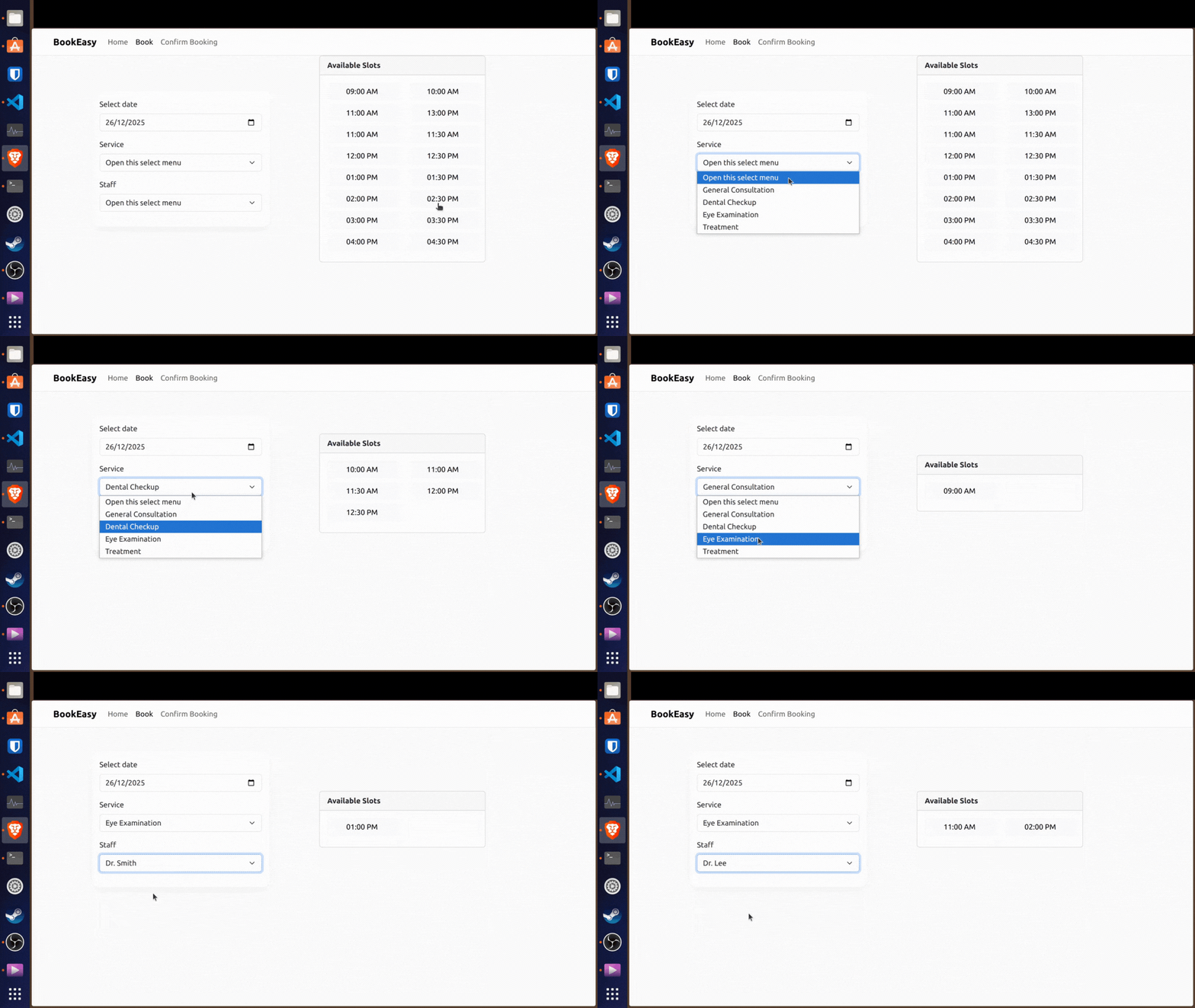
Goal: The available slots should be filtered based on what’s been selected in the form by service and staff member.
Local data file
export type ServiceData = {
  id: number
  name: string
}

export const services: ServiceData[] = [
  { id: 1, name: 'General Consultation' },
  { id: 2, name: 'Dental Checkup' },
  { id: 3, name: 'Eye Examination' },
  { id: 4, name: 'Treatment' },
]

export type StaffData = {
  id: number
  name: string
}

export const staffMembers: StaffData[] = [
  { id: 1, name: 'Dr. Smith' },
  { id: 2, name: 'Dr. Johnson' },
  { id: 3, name: 'Dr. Lee' },
  { id: 4, name: 'Dr. Wilson' },
]

export type AvailableSlots = {
  id: number
  time: string
  serviceId: number
  staffId: number
}

export const availableSlots: AvailableSlots[] = [
  { id: 1, time: '09:00 AM', serviceId: 1, staffId: 1 },
  { id: 2, time: '10:00 AM', serviceId: 2, staffId: 2 },
  { id: 3, time: '11:00 AM', serviceId: 3, staffId: 3 },
  { id: 4, time: '13:00 PM', serviceId: 4, staffId: 4 },

  { id: 5, time: '11:00 AM', serviceId: 2, staffId: 1 },
  { id: 6, time: '11:30 AM', serviceId: 2, staffId: 2 },
  { id: 7, time: '12:00 PM', serviceId: 2, staffId: 3 },
  { id: 8, time: '12:30 PM', serviceId: 2, staffId: 4 },

  { id: 9, time: '01:00 PM', serviceId: 3, staffId: 1 },
  { id: 10, time: '01:30 PM', serviceId: 3, staffId: 2 },
  { id: 11, time: '02:00 PM', serviceId: 3, staffId: 3 },
  { id: 12, time: '02:30 PM', serviceId: 3, staffId: 4 },

  { id: 13, time: '03:00 PM', serviceId: 4, staffId: 1 },
  { id: 14, time: '03:30 PM', serviceId: 4, staffId: 2 },
  { id: 15, time: '04:00 PM', serviceId: 4, staffId: 3 },
  { id: 16, time: '04:30 PM', serviceId: 4, staffId: 4 },
]
- Declare states, you do this to the parent component that will render child component. In this instance, this will be the booking form and available slots.
- Make sure to import React State and then declare the states for what you want to filter by. In this case, selected date, service and staff.
import { Row, Col } from "react-bootstrap";
import BookingForm from "../../components/booking/BookingForm";
import AvailableSlots from "../../components/booking/AvailableSlots";
import { useState } from "react";

function Book() {

    const [selectedDate, setSelectedDate] = useState("");
    const [selectedService, setSelectedService] = useState<number | null>(null);
    const [selectedStaff, setSelectedStaff] = useState<number | null>(null);
    return (
        <Row className="align-items-center" style={{ minHeight: "60vh" }}>
            <Col md={{ span: 4, offset: 1 }} className="rounded-4 p-3 booking-card">
                <BookingForm
                    selectedDate={selectedDate}
                    setSelectedDate={setSelectedDate}
                    selectedService={selectedService}
                    setSelectedService={setSelectedService}
                    selectedStaff={selectedStaff}
                    setSelectedStaff={setSelectedStaff}
                />
            </Col>
            <Col md={{ span: 4, offset: 1 }} >
                <AvailableSlots
                    selectedService={selectedService}
                    selectedStaff={selectedStaff}
                />
            </Col>
        </Row>
    );
}

export default Book;
- Then in the components we have to declare props to pass these through.
- For typescript you have to declare a types for the props.
- Import the local data and map to show each row of data.
import Form from 'react-bootstrap/Form';
import { services } from "../../data/bookingData";
import { staffMembers } from "../../data/bookingData";

type BookingFormProps = {
    selectedDate: string;
    setSelectedDate: (value: string) => void;

    selectedService: number | null;
    setSelectedService: (value: number | null) => void;

    selectedStaff: number | null;
    setSelectedStaff: (value: number | null) => void;
};

function BookingForm({ selectedDate,
    setSelectedDate,
    selectedService,
    setSelectedService,
    selectedStaff,
    setSelectedStaff }: BookingFormProps) {
    return (
        <>
            <Form>
                <Form.Group className="mb-3" controlId="bookingDate">
                    <Form.Label>Select date</Form.Label>
                    <Form.Control type="date" className="booking-input" value={selectedDate} onChange={(e) => setSelectedDate(e.target.value)} />
                </Form.Group>
                <Form.Group className="mb-3" controlId="bookingService">
                    <Form.Label>Service</Form.Label>
                    <Form.Select aria-label="Default select example" className="booking-input" value={selectedService ?? ""} onChange={(e) => setSelectedService(e.target.value ? Number(e.target.value) : null)} >
                        <option>Open this select menu</option>
                        {services.map((service) => (
                            <option key={service.id} value={service.id}>{service.name}</option>
                        ))
                        }

                    </Form.Select>
                </Form.Group>
                <Form.Group className="mb-3" controlId="bookingStaff">
                    <Form.Label>Staff</Form.Label>
                    <Form.Select aria-label="Default select example" className="booking-input" value={selectedStaff ?? ""} onChange={(e) => setSelectedStaff(e.target.value ? Number(e.target.value) : null)} >
                        <option>Open this select menu</option>
                        {staffMembers.map((staff) => (
                            <option key={staff.id} value={staff.id}>{staff.name}</option>
                        ))
                        }

                    </Form.Select>
                </Form.Group>
            </Form>      {/* Booking form implementation goes here */}
        </>
    );
}

export default BookingForm;
- Next based on the user selection we want to store this in the state and trigger the function for it.
<Form.Select aria-label="Default select example" className="booking-input" value={selectedStaff ?? ""} onChange={(e) => setSelectedStaff(e.target.value ? Number(e.target.value) : null)} >
- Now with the values recorded, in the available slots component it’s time to filter the available slots data using props.
- Checking if there is a selected service or staff then check if the ID matches what’s been selected as a filter.
- The filtered records are then mapped to show a button for each slot.
import Card from "react-bootstrap/Card";
import Button from "react-bootstrap/Button";
import Row from "react-bootstrap/Row";
import Col from "react-bootstrap/Col";
import { availableSlots } from "../../data/bookingData";

type AvailableSlotsProps = {
    selectedService: number | null;
    selectedStaff: number | null;
};

function AvailableSlots({selectedService, selectedStaff }: AvailableSlotsProps
) {

    console.log("Selected Service ID:", selectedService ?? "none");
    console.log("Selected Staff ID:", selectedStaff ?? "none");
    const filteredSlots = availableSlots.filter(slot =>
        (selectedService ? slot.serviceId === selectedService : true) &&
        (selectedStaff ? slot.staffId === selectedStaff : true)

    );

    return (
        <Card>
            <Card.Header><b>Available Slots</b></Card.Header>
            <Card.Body>
                <Row>
                    {filteredSlots.map((slot) => (
                        <Col md={6} className="mb-2" key={slot.id}>
                            <Button variant="light" className="w-100" value={slot.time} key={slot.id}>
                                {slot.time}
                            </Button>
                        </Col>
                    ))}
                </Row>
            </Card.Body>
        </Card>
    );
}

export default AvailableSlots;
Finished screen :)